
Before You Begin
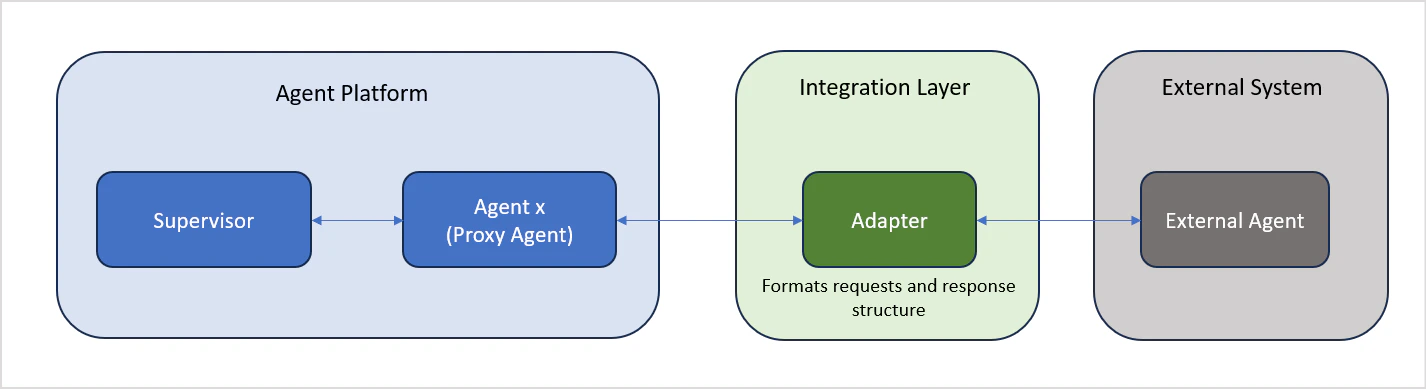
- External agents must conform to the Agent Protocol. The Platform sends requests and expects responses in a defined structure. If your external agent uses a different format, build an adapter layer first. See Handling Format Variations.
Step 1: Set Up the Agent Profile
Name
Choose a unique name that reflects the external agent’s function and makes it clearly identifiable alongside native agents.Description
Write a description that tells the orchestrator when to route requests to this agent. Be specific about the agent’s responsibilities and how it differs from others in the application.External Platform
Enter the name of the external platform this agent connects to (for example, LangGraph, Vertex AI Agent Builder, or a custom service). This acts as an identifier for the external agent.Avatar
Select an avatar from the available list. External agents appear alongside native agents in the user interface.Step 2: Configure the Agent Definition
The agent definition section specifies how the proxy agent communicates with the external agent.Request Definition
Define the complete API call structure the proxy agent will use to reach the external agent:| Field | Description |
|---|---|
| HTTP Method | The HTTP method for the request (GET, POST, PUT, DELETE) |
| URL | The full endpoint URL of the external agent |
| Request Headers | Key-value pairs for authorization and context |
| Request Body | Payload structure for POST or PUT requests — see Request Format |
| Response | Displays the API response when you run a test |
Asynchronous Integration
Enable this option if the external agent returns responses asynchronously. When enabled, the proxy agent exposes a callback URL that the external agent uses to deliver its response.Timeout
Set the maximum duration (in seconds) the proxy agent will wait for a response. If no response is received within this period, the request fails with a timeout error.Route Response to User
When enabled, the external agent’s response is delivered directly to the user, bypassing the supervisor. Use this when:- Real-time responsiveness is a priority
- The external agent is fully trusted to handle queries independently
- Responses should be delivered as-is, without modification or enrichment
Step 3: Configure Delegation
Applies to: Apps using the Adaptive Network orchestration pattern only. Add delegation rules to define how this agent routes tasks to other agents in the application. See Network Orchestration for details.Review and Create
Review all configuration settings, then click Create to register the external agent as a proxy agent in your application.Request and Response Formats
The proxy agent communicates with external agents using a defined structure. Your external agent must accept requests and return responses in the formats described below.Request Format
The proxy agent sends requests to the external agent in the following structure:| Field | Required | Description |
|---|---|---|
sessionIdentity | Yes | Maintains session continuity across conversation turns |
input | Yes | The user’s input passed to the external agent |
debug | No | Enables debug mode. Set enable to true and debugMode to "thoughts" |
stream | No | Enables response streaming. Set streamMode to "token" or "messages" (only messages is currently supported) |
metadata | No | Passes metadata into sessionMeta memory for the duration of the session |
Response Format
The external agent must return responses in the following structure:| Field | Description |
|---|---|
output | The response content from the external agent |
debug | Debug information, included when debug mode is enabled |
sessionInfo | Session state and metadata. When streaming, partial output events are sent first; the complete stitched output is then sent as a single unit under sessionInfo |
Handling Format Variations
If your external agent does not follow the expected request or response format, create an adapter service between the Platform and your external agent:- Build an adapter that accepts the platform’s request structure
- Convert the request to the format your external agent expects
- Reformat the external agent’s response to match the platform’s response structure
Key Characteristics
| Feature | Description |
|---|---|
| Secure communication | Encrypted data exchange between the proxy and external agent |
| Protocol translation | Automatic conversion between Platform and external formats |
| Timeout management | Automatic handling of communication failures and timeouts |
| Unified interface | External agents appear alongside native agents in the UI |
| Status visibility | Clear visual indicator of the external agent’s connection status |