
dockStatusId, which can be used with the Get Dock Status API to track the export progress. The API response also includes an exportJobId for tracking the specific export job.
Additionally, the response provides a download URL. Copy and paste this URL into a browser or API client to download the exported tool file.
| Method | POST |
|---|---|
| Endpoint | https://{host}/api/public/tools/:{toolId}/export?flowId={callflowId} |
| Content Type | application/json |
| Authorization | X-api-key - The API key used for authentication. |
- Follow the steps mentioned here to export a tool.
- Open developer tools.
- Select the Network tab.
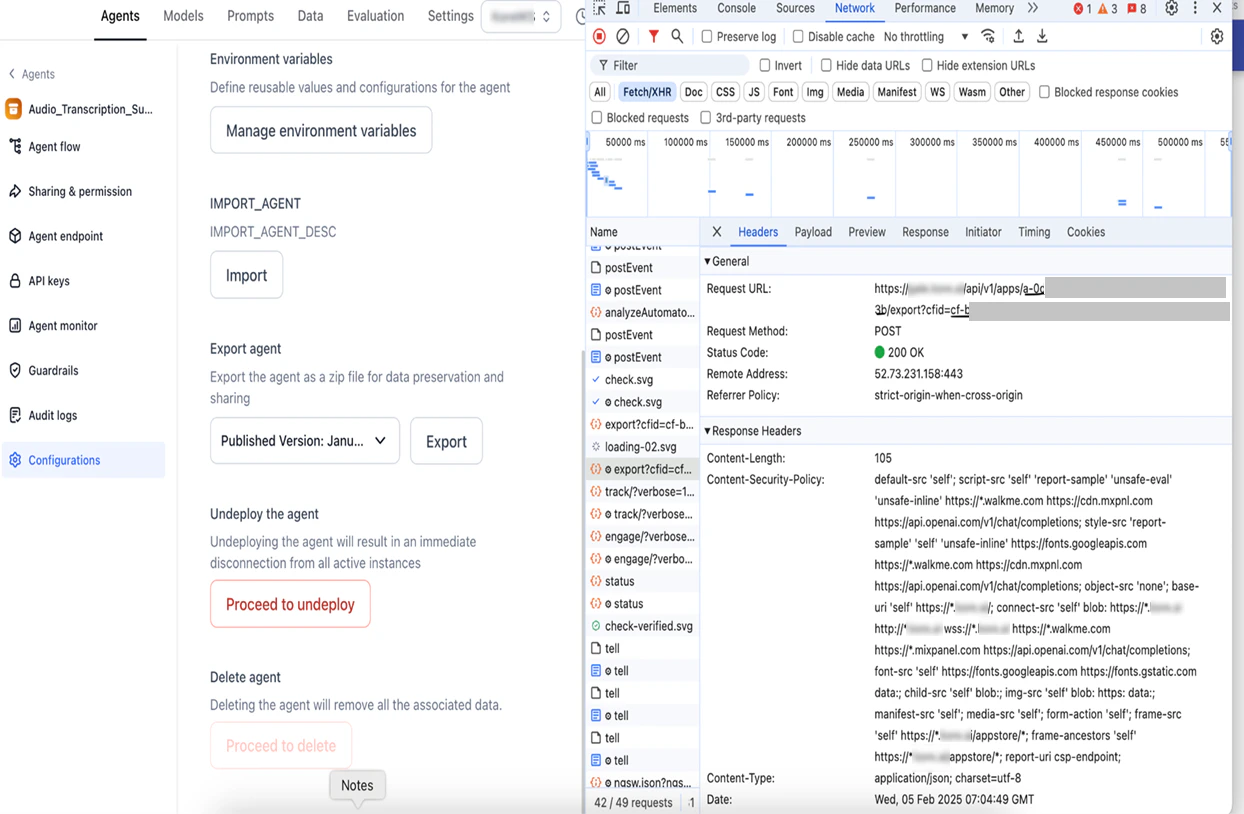
- Monitor the Export API to capture
toolIdandcallflowId.
Query Parameters
| PARAMETER | DESCRIPTION | TYPE | REQUIRED/OPTIONAL |
|---|---|---|---|
| host | The environment URL. For example, https://agent-platform.domain.ai/ | String | Required |
| toolId | The tool ID of the tool being exported. | String | Required |
| callflowId | The callflow ID for the deployed tool. | String | Required |
Sample Request
Body Parameters
No parameters are passed.Sample Response
Response Parameters
| PARAMETER | DESCRIPTION | TYPE |
|---|---|---|
| dockStatusId | The unique identifier to track the status of the tool export process. | String |
| toolId | The unique identifier for the tool. | String |
| jobType | The type of job being performed. | String |
| action | The action that is performed on the tool. | String |
| status | The current status of the job. | String |
| exportJobId | The unique Identifier to track the specific export job. | String |
| downloadURL | The url to download the exported tool file. | String |