v11.21.1 January 31, 2026
This update includes an enhancement and bug fixes. The key enhancement included in this release is summarized below.Channels
Right-to-Left Language Support in WebSDK The WebSDK channel now supports right-to-left (RTL) languages. Responses in Arabic and other RTL languages automatically align in RTL format, improving readability and delivering a more natural user experience. MS Teams Channel Analytics Enhancement MS Teams channel analytics now supports the team channel login email ID instead of the alphanumeric channel ID across the platforms. Enable the toggle “Show email ID instead of channel ID” in the channel integration settings to replace channel user ID with email IDs throughout your analytics dashboards. Learn more →Admin Console
Support for External ID in BYOK Configurations BYOK AWS configurations now include an auto-populated External ID field for secure cross-account IAM role assumption, in line with AWS best practices. Learn more →v11.21.0 January 17, 2026
This update includes enhancements and bug fixes. The key enhancements included in this release are summarized below.LLM & Generative AI
Prompts Library: Usage Status and Association Tracking The Prompts Library will display “In Use” and “Not in Use” statuses for custom prompts based on actual usage at the feature or node level, replacing the previous “Active” and “Inactive” labels. Learn more →Channels
Email Thread Continuity When Adding Recipients The email channel now supports adding To, CC, and BCC recipients mid-conversation without breaking the email thread. When users or agents add recipients, the platform maintains the existing thread and preserves conversation context, allowing all participants to join and respond seamlessly. Learn more → Email Channel Session Configuration and Analytics Updates Changes to channel-based and thread-based session configurations (enable or disable) are now captured in change logs for improved audit tracking. Email Channel analytics updates are reflected in Generative AI Usage Logs and Get Analytics API. New Channel Integration: Microsoft Copilot Microsoft Copilot is now available as a communication channel, expanding integration options beyond the existing Microsoft Teams channel. Learn more →App Settings
CVV Data Type in Global PII Settings The Global PII settings now include a CVV data type for redacting credit card verification values (3 or 4 digits) at entry. This prevents CVV data from persisting in logs or storage, and automatically purges it after session closure. Learn more → Dialog Filter for Locale-Specific Responses Language Management now offers a Dialog filter, in addition to the existing Language and Component Type filters, for efficiently managing locale-specific responses. Learn more → Localization Support for Standard Responses Standard Responses now support language-specific configurations across conversation management areas, including Dialog Interruptions, DialogGPT Events, Virtual Assistant Events, Intent Events, and Conversation Events. Centralized URL Management and Revocation Controls Admins can now centrally manage security settings for Platform-generated URLs (chat history and attachments). They can configure expiry times and optional access limits at the app level, and instantly revoke all active URLs using an emergency revocation control for enhanced security and compliance. Learn more →Analytics
Unified Interactions Dashboard Availability The ‘Interactions Dashboard’ has been renamed to “Conversations” and is now accessible to all licensed users under ‘Analytics’ > ‘Overview’. It provides unified access to real-time latency reports and session analytics across all products. Learn more →v11.20.0 December 07, 2025
This update includes enhancements and bug fixes. The key enhancements included in this release are summarized below.LLM & Generative AI
Prompts Library: Search and Filter The Prompt Library now offers enhanced search, sorting, and multi-select filtering by name, feature, model, type, status, or usage, with a Quick Filter for instant access to system and custom prompts. Learn more →Channels
Enhanced Session Management for Email Channel The Email Channel now supports more accurate session handling through two new app-level configurations. These improvements prevent unintended session merging, preserve context, and provide a clearer experience across automation and agent workflows.- Channel-Based Sessions: Creates a new session based on the “To” email address. Emails sent to different support addresses always start new sessions, keeping unrelated issues separate.
- Thread-Based Sessions: Creates a new session based on the email thread’s Reference ID. Replies within the same thread continue the session, while new threads start new sessions. Available only when Channel-Based Sessions are enabled.
App Settings
Unified Interface for Locale-specific Responses A new ‘Locale-specific Responses’ section in Languages Management provides a consolidated view of all language-dependent components - Dialog Components, Standard Responses, Content Variables, and Small Talk, streamlining multilingual app development. Developers can now update prompts and messages for all enabled languages from this single interface. Learn more →v11.19.1 November 19, 2025
This update includes an enhancement and bug fixes. The key enhancement included in this release is summarized below.Channels
New Channel Integration: Amazon Connect Chat Amazon Connect Chat is now available as a communication channel, enabling real-time user interactions with AI Agents. The integration supports both hosted and custom widget configurations. Learn more →v11.19.0 October 25, 2025
This update includes enhancements and bug fixes. The key enhancements included in this release are summarized below.Channels
Multiple Files Upload Support in WebSDK WebSDK v3 now enables users to upload multiple files simultaneously in a single action. Users can select up to 10 files at once, with each file limited to 25 MB. The platform returns all file URLs as an array for seamless integration with downstream workflows. The maximum file count is configurable to accommodate different organizational needs.APIs
Public API Response Payload Encryption AI for Service now supports Response Payload Encryption to protect sensitive data in Public API responses. When enabled, each response is encrypted using a client-provided public key, ensuring that only the intended client can decrypt and access the data. The feature strengthens data confidentiality, maintains integrity across API communications, and provides an additional layer of enterprise-grade security. Learn more →v11.18.0 September 27, 2025
This update includes enhancements and bug fixes. The key enhancement included in this release is summarized below.Channels
Enhanced Custom Email Domain Capabilities AI for Service now enhances custom domains with advanced capabilities, including email forwarding, domain setup, DKIM, and Flow mapping to improve scalability and brand alignment in enterprise email automation. Key enhancements:- Email Forwarding: Centralize email processing by forwarding emails from enterprise domains to a single Kore.ai mailbox.
- Advanced Custom Domain Setup: This new option, in addition to the existing Standard setup, supports up to 50 custom domains and 50 email addresses per domain.
- DomainKeys Identified Mail (DKIM) Support: Secure email authentication is now provided for each advanced custom email domain.
- Flow Mapping by Email ID: Route incoming emails accurately by linking custom domain email addresses to specific Flows. Learn more →
v11.17.1 September 15, 2025
This update includes enhancements and bug fixes. The key enhancement included in this release is summarized below.LLM & Generative AI
New GenAI Dashboard for LLM Usage and Performance Monitoring The new GenAI Dashboard offers comprehensive insights into LLM token usage and performance across AI for Service. Users can track token consumption by modules, models, and features, with detailed analytics available in the Performance Analytics section. This capability enables organizations to effectively manage infrastructure costs, optimize AI performance, and make informed decisions when scaling AI capabilities. Learn more → Manage LLM Token Limits, Usage Cycles, and Notifications AI for Service now allows users to define token usage limits and usage cycles for all LLM Integrations (except XO GPT). Users can also set up automated notifications when token thresholds are reached, enabling proactive cost management, preventing budget overruns, and supporting informed decisions about scaling AI features based on real usage patterns. Learn more → Enhanced Model Library UI The enhanced Model Library interface improves LLM visibility and organization by clearly separating configured integrations from available ones. Configured integrations now display token consumption if configured, providing clearer usage insights and easier control over the integration. Learn more → Anonymize Sensitive Data in LLM Calls The Platform now supports anonymizing sensitive data (entities, tool parameters) before LLM interactions. Users can define regex patterns for redaction, masking, or replacement. When the LLM-layer PII option is enabled, anonymization applies only during language model interactions, with original values restored afterward. Conversations and debug logs always show unmasked data. LLM-layer PII works alongside global PII, with global settings taking precedence. Learn more → Vector Generation Feature Split into Text and Image The Vector Generation feature is now split into separate Text and Image components, providing independent control over models, prompts, and feature enablement for each content type. The new XO GPT-VDR model generates visual embeddings, while existing configurations are preserved under the Vector Generation – Text feature. Learn more →v11.17.0 August 23, 2025
This update includes bug fixes.v11.16.1 August 11, 2025
This update includes bug fixes.v11.16.0 July 26, 2025
This update includes enhancements and bug fixes. The key enhancements included in this release are summarized below.LLM & Generative AI
Contact Centre AI Filter Added in the GenAI Features Framework Contact Center AI (CCAI) has been integrated into the product filtering framework for Generative AI Tools along with Automation AI, Search AI, and Agent AI, providing uniform visibility, searchability, and contextual filtering across all products. Learn more →App Setting
Tagalog Language Detection Support AI for Service now accurately identifies Tagalog, ensuring the accurate classification of Tagalog utterances and enabling seamless multilingual app experiences.BotKit
BotKit Events for Key Contact Center Actions BotKit now emits key contact center events (agent acceptance, transfers, session closure, disposition submission, and join/leave actions) with structured JSON payloads, enabling real-time CRM sync via customer-defined logic. Admins can configure event types from the BotKit settings panel, with support for retry mechanisms, custom headers, and full traceability logging. Learn more →v11.15.1 July 12, 2025
This update includes enhancements and bug fixes. The key enhancement included in this release is summarized below.LLM & Generative AI
Enhanced Model Visibility Across GenAI Features Configured language models are now visible and accessible across all GenAI features, regardless of prompt availability, with streamlined prompt creation workflows. This enhancement ensures users can always see and access their properly configured language models, with clear pathways to activate them through guided prompt creation.v11.15.0 June 30, 2025
This update includes enhancements and bug fixes. The key enhancements included in this release are summarized below.Audit Logs
Audit Logs for Agent Profile Updates Enhanced the User Management audit logs to capture all agent profile-related actions, including create, update, delete, activate/deactivate, and role or privilege changes. Each log entry includes a timestamp, the user who performed the action, and the target user’s details. The system also logs failed or unauthorized attempts. These updates improve traceability, support compliance, and ensure complete visibility into user management activities. Learn more → App-to-App Communication Enabled for New Apps App-to-app communication is now supported for newly created apps, enabling one app to call flows, dialogs, automation nodes, and script nodes from another. This allows the reuse of logic, such as queue or skill assignments, using functions like setQueue() or setSkill() across apps. They can be referenced from dialogs or scripts when designing flows in a different app.Getting Started
Removal of auto purchase of Phone number in the App creation process The automatic phone number provisioning feature, introduced during app creation, has been removed. Users will now have the flexibility to manually provide a phone number for voice channel testing if needed via the channel configuration section. Key benefits- Improves resource efficiency by provisioning phone numbers only when needed.
- Simplifies the onboarding experience.
Channels
Retirement of Skype Microsoft has officially retired the Skype channel. In alignment with this deprecation, the following changes are being implemented across the platform.Rebranding
Renaming of Platform Components As part of the revised product strategy, the XO Platform is being repositioned as AI for Service, aligning it with the broader product suite (AI for Work and AI for Process). This change accurately reflects the platform’s core value proposition and enhances brand consistency across all products.Learn more →
APIs
Support for Proactive Notifications for WhatsApp via Public API The Proactive Notifications feature for WhatsApp has been enhanced to support multi-user messaging using a public API, enabling businesses to send outbound messages to multiple recipients simultaneously. Key features- Multi-user messaging in a single API call.
- JWT-based authentication for secure access.
- Per-client rate limiting for system stability.
- Granular logging for improved tracking and debugging.
v11.14.1 June 14, 2025
This update includes enhancements and bug fixes. The key enhancements included in this release are summarized below.App Language
German Language Support for Apps (Beta) The platform has enabled German language selection for the App, allowing platform users to access the app in their native language. Key updates- The Language selection dropdown has been added to Profile, Login, and Signup pages.
- The “BETA” tag indicates the feature’s beta status.
- Dynamic translation of UI elements and content based on the selected language.
Channels
Proactive Notifications Support for Google Hangouts The platform now supports proactive notifications for Google Hangouts, enabling it to push relevant updates to users without requiring them first to initiate interaction with the bot. This feature enhances user engagement by delivering timely information directly to users. Learn more →v11.14.0 May 31, 2025
This update includes enhancements and bug fixes. The key enhancements included in this release are summarized below.Migration
Migration of Universal Bots from XO10 Bot to XO11 Automation Apps XO10 Universal Bots act as orchestrators that route user inputs to linked Standard Bots for intent handling. In XO11, this orchestration is supported within a Standard App via DialogGPT, eliminating the need for a separate Universal Bot construct. This release introduces a guided migration path to help users seamlessly transition XO10 Universal Bots into the XO11 framework. Learn more→Channels
Repeat Bot Response Event now supports SmartAssist Gateway Channel The platform now supports the SmartAssist Gateway channel for the Repeat Bot Response event. This allows end-users to ask the virtual assistant to repeat its recent responses during a conversation. This support is in addition to the existing voice channels: IVR, AudioCodes, and Twilio Voice. Learn more→Flows
Agent Transfer Node: Restriction on Prompting Tasks and Dialog Configuration To prevent execution issues where flows unexpectedly return to the welcome message, the Agent Transfer node now includes a note clarifying supported dialog types. When selecting a specific dialog within this node, only preprocessing tasks should be used, not prompting tasks. Prompting tasks, such as those containing entity nodes, can interrupt the flow and prevent the Agent Transfer from executing correctly. Learn more →APIs
Support for Proactive Notifications for Webhook Channel via Public API The Proactive Notifications feature for Webhook Channel has been enhanced to support multi-user messaging using a public API, enabling businesses to send outbound messages to multiple recipients simultaneously. Key features- Multi-user messaging in a single API call.
- JWT-based authentication for secure access.
- Per-client rate limiting for system stability.
- Granular logging for improved tracking and debugging.
Voice Call Properties
Support for Language-specific Voice Call Properties The platform now supports language-specific configuration of voice call properties, including prompts and grammar, across IVR-supported components, enabling seamless multilingual IVR bot experiences. Key Changes- Platform users can now define unique voice call properties as per the enabled language.
- When a new language is added to a bot, existing voice properties from the selected base language are auto-copied to the new language.
- When adding new components, voice property fields will remain empty by default across all languages, allowing independent language-specific configuration. Learn more→
Role Management
Enhanced Permissions for the Billing Module The Platform has strengthened security by restricting the Billing Module to App Owners and users with custom roles. This ensures sensitive functions are protected while maintaining a streamlined experience for other user roles. Learn more→v11.13.1 May 17, 2025
This update includes only bug fixes.v11.13.0 May 03, 2025
This update includes enhancements and bug fixes. The key enhancements included in this release are summarized below.User Management
Enhanced User Management Accessibility Previously, the User Management menu option was accessible via the product switcher and Contact Center AI. Now it is located in the left navigation of Automation AI, Search AI, and Agent AI, providing uniform access and improving user experience across the primary modules. Learn more →Role Management
Enhanced Permissions Framework for App Owners The Platform has strengthened security and updated system roles by restricting certain critical administrative functions to App Owners only, ensuring sensitive app functions are protected while maintaining a streamlined experience for other user roles. The following permissions are implicitly available only to App Owners and are not available to any other user roles:- Billing Module Access
- Activation of Free Tokens
- Create New User Role
- App Profile Modification
- Delete App
v11.12.1 April 19, 2025
This update includes only bug fixes.v11.12.0 April 05, 2025
This update includes enhancements and bug fixes. The key enhancements included in this release are summarized below.LLM & Generative AI
Unified Generative AI and LLM Interface This update introduces a new unified interface for Generative AI and LLM capabilities, logically organized features under product categories (Automation AI, Search AI, Agent AI), and a search bar for quick feature discovery.Learn more →
Admin Console
SSO Compatibility Improvement The Platform has introduced a new configuration option to enhance Single Sign-On (SSO) compatibility and resolve authentication issues caused by the RequestedAuthnContext parameter in SAML requests. This ensures seamless integration with various identity providers, including Azure AD.Learn more →
v11.11.1 March 15, 2025
This update includes enhancement and bug fixes. The key enhancement included in this release is summarized below.Voice Gateway (v0.9.3-8)
Enhanced Diagnostics for Comprehensive Participant Tracking and Quality Metrics The Agents tab provides Agents and Supervisors with comprehensive call analytics. It displays key information for all participants, including their status (In-Call/Left), timestamps, and quality metrics (MOS, jitter, packets lost). This enhances troubleshooting by showing detailed call exit reasons and descriptions for each participant. Active participants are indicated with “NA” in the End Timestamp field, while External Agents are labeled with an “External Agent” tag, improving visibility and simplifying the debugging process. Learn more →v11.11.0 March 04, 2025
This update include enhancement and bug fixes. The key enhancement included in this release is summarized below.LLM & Generative AI
Azure OpenAI GPT-4o Mini and OpenAI GPT-4o Mini Support The Platform now supports the GPT-4o mini model for various GenAI features. The model provides similar responses to GPT-4o at a lower cost and latency, balancing performance and efficiency for real-time applications. The integration does not include system prompts, but it can be used with custom prompts.Getting Started
Optimized Workspace Switching Experience The “Browse Workspace” feature has been optimized for a faster and more responsive user experience. Users can easily switch between their existing workspaces, which they are part of, or browse for other workspaces in the same domain and request access to a workspace. Learn more →Flows and Channels
Voice-to-Chat Deflection The new Voice-to-Chat Deflection feature allows platform users to create conversation flows that seamlessly transition from voice interactions to chat-based interactions within the same context. This feature works only with Kore Voice Gateway Channels (Phone number or SIP Transfer). Key changes- The “Deflect to Chat” option is added to the Dialog Builder’s “Return to Flow” property with two deflection types - ‘Automation’ and ‘Agent Transfer’.
- The Flow Builder now includes a dedicated “Deflect to Chat” connection path and node type to handle the transition from voice to chat.
- Enhanced customer experience through optimal channel selection.
- Shorted resolution time by offering chat-based interactions when voice queues are long.
- The feature is fully backward-compatible with existing voice implementations.
Voice Gateway (v0.9.3-8)
Spanish Language Support for ElevenLabs Text-to-Speech Added Spanish language support through ElevenLabs Text-to-Speech integration. This enhancement expands our language capabilities and provides users with high-quality Spanish voice synthesis options. The ElevenLabs TTS engine option is available in the following locations when Spanish language is selected:- Start Flow
- Manage Preferences within the Voice Preferences section
- Start node
- Added comprehensive Spanish/Latin American voice portfolio
- All ElevenLabs Spanish voices are now available in the voice selection dropdown
voiceutils, enabling automated customer notifications for voicemail events.
- message: Before the voicemail is recorded, a customizable prompt, such as “Please leave your voicemail now,” is played to customers.
- beepRequired: It controls whether a beep sound plays after the prompt, signaling to customers that the voicemail recording is starting.
- transcriptionRequired: Enables/disables automatic voicemail transcription. When enabled, it generates text transcription upon recording completion.
- notifyUrl: Endpoint for receiving voicemail notifications.
Format:https://your-domain/endpoint - metaInfo: Customizable metadata included in notifications. Learn more →
- Suspends transcription generation for customer audio.
- Suspends transcription generation for agent audio.
- Automatically resumes transcription when the hold state ends.
- Temporarily stops recording customer-side audio.
- Temporarily stops recording agent-side audio.
- Automatically resumes recording when the hold state ends.
- Start/Stop recording control
- Pause/Resume functionality
- Allow seamless IVR navigation without waiting for connection confirmation.
- Reduce disruptions caused by delayed network responses.
- Enhance agent experience by maintaining essential call controls at all times.
v11.10.0 February 12, 2025
This update include enhancement and bug fixes. The key enhancement included in this release is summarized below.LLM & Generative AI
Support for Provider’s New LLM in the Out-of-box Integration Framework With this update, platform users can leverage the latest LLMs as soon as they become available. The XO Platform now enables the immediate addition of new language models as system models within the out-of-box Pre-built Integration framework. Key benefits- Quickly access newly launched language models without waiting for the platform to make the new models available.
- Create custom prompts for new models from scratch or by importing an existing prompt from another model.
- Maintain platform security and authentication standards while eliminating integration delays.
Getting Started
Simplified Onboarding Journey and Customizable App Icons The XO Platform now offers a streamlined onboarding experience with simplified product selection, an improved signup flow, and an easy-to-follow Quick Start & Setup Guide. These changes help platform users get started faster, focus on what matters, and see value sooner. In addition, the platform allows users to personalize their app icons. They can select from a dropdown of preset icons and colors or upload a custom PNG or JPG icon up to 80x80 pixels in size. Learn more →Billing & Payments
Usage Trends Enhancements for Improved Billing Insights The Usage Trends section now includes a new Billing Session Widget. This widget provides key metrics to help app users easily understand and manage their apps’ usage. The Widget includes- Consolidated view of billing sessions, voice sessions, and agent counts.
- Filtering by date range (24 hours, 7 days, 30 days, or custom).
- Clear graphical representation of usage trends.
- Hover tooltips for detailed data points.
- Automation AI Billing Sessions: 15 minutes of bot/app interaction.
- API Requests: Each triggered request is counted as a session.
- Voice Gateway Sessions: 15 minutes of voice interaction.
- Agent Count: Concurrent Agent Seats that the customers have subscribed to for the given time.
Kore Voice Gateway (v0.9.3-1)
Audit Log for ‘SIP Trunk Configuration’ Changes and Proper Failure Reasons The audit logs now record the following information when the SIP trunk configuration is updated.- Updated Time Stamp along with Time Zone
- Updated by
General Availability of a Key Feature
We are announcing the general availability (GA) of the DialogGPT Module to all our users.v11.9.1 January 25, 2025
This update includes only bug fixes.v11.9.0 January 05, 2025
This update include enhancement and bug fixes. The key enhancement included in this release is summarized below.LLM & Generative AI
Enhanced Usage Logs for Guardrails The Usage Logs now provide more comprehensive insights into guardrails performance and token consumption. These insights enable platform users to better track and analyze the effectiveness of their configured guardrails, identify patterns in breaches, optimize costs, and streamline the debugging process. Key enhancements- Failed guardrail tracking with identifiers and failure explanations.
- Analytics table for configured guardrails, outcomes, and risk scores
- Input and output token count monitoring.
- Expanded export columns, including guardrail risk scores and token counts.
Admin Console
Enhanced Get Bots API The Get Bots API now includes crucial authentication and security metadata for each bot, enabling better management and auditing. Key updates- Added fields to bot objects in API response: clientId, clientSecret, jtiClaimEnforced, and jweEncryptionEnforced.
- No changes to endpoint structure (backward compatible).
- Comprehensive bot details, including auth credentials.
- Visibility into per-bot security configurations.
- Streamlined management and compliance workflows.
App Settings
Auto-Save for App Profile Settings The platform now ensures consistent Auto-Save behavior across all configurations in the App Profile menu of the App Settings page. This update aligns the App Settings page with other areas of the platform, such as the Property Panel and NLP Training Configurations, offering users a seamless and intuitive experience. Key updates- Auto-save on blur for App Name, App Description, and other settings.
- Toaster messages to confirm the successful saving of changes.
- Special handling for renaming published apps.
- Removal of the Save button at the bottom of the page.
App Language
Japanese and Korean Language Support in the App (Beta) The platform has enabled Japanese and Korean language selection for the App, allowing platform users to access the app in their native language. Key updates- Language selection dropdown added to Profile, Login, and Signup pages.
- The “BETA” tag indicates the feature’s beta status.
- Dynamic translation of UI elements and content based on selected language.
- Improved accessibility for Japanese and Korean users.
- Consistent language selection across the app.
- Leverages existing backend localization for seamless translation.
v11.8.1 December 19, 2024
This update includes bug fixes.v11.8.0 December 11, 2024
This update include enhancement and bug fixes. The key enhancement included in this release is summarized below.LLM & Generative AI
Zero-Shot Enhancements The Zero-Shot intent detection model has been significantly enhanced to improve contextual understanding and intent-matching accuracy, addressing challenges related to large intent sets and false positives. Key Updates- Expanded Input: The enhanced model now incorporates intent descriptions, conversation history, list of intents, and user utterances for more accurate intent recognition.
- New Prompt Structure: A new prompt, “Zero-Shot-V2,” is available for XO v10 and v11, enabling platform users to input additional contextual components.
- System Prompts: Pre-built system prompts are provided for out-of-the-box integrations (Azure OpenAI and OpenAI), allowing the users to leverage the enhanced Zero-Shot Model without crafting custom prompts.
- Custom Prompts: Platform users can create custom prompts linked to system models for Zero-Shot, offering full control over prompt design to tailor them to specific features, contexts, and user needs.
- Custom LLM Support: The Zero-Shot ML model can now be used with the Bring Your Own Model (BYOM), enabling platform users to define prompts and leverage the enhanced capabilities with their custom LLMs.
Bot Admin Console
Consolidated Billing Session Widget The Bot Admin Console now includes a Billing Session Widget, providing admins with a consolidated view of key billing metrics across all apps in their workspace. This graphical widget displays:- Billing Sessions: Total number of completed sessions.
- Voice Sessions: The count of Voice Sessions in a conversation consumed in an App; calculated as every 15 minutes of interaction with the Virtual Assistant or an Agent.
- Agent Count: The count of agents subscribed to the plan for each app.
App Settings
Change Log Improvements: Module Field and Detailed Views The Change Logs feature has been updated to provide better context and more detailed information about configuration changes made within XO 11. Key Improvements- Module Field: Each log entry has a new “Module” field indicating which XO 11 module the change originated from. Possible module values include Automation AI and Global (for changes related to Settings, User Management, Deployment, Billing, Experience Flows, Channels, and GenAI Configs).
- Detailed Views: Log entries now include a “Details” link whenever additional information is available. The link opens a side panel displaying a JSON view of the full change details. It helps access the complete technical information for each change without cluttering the main log view.
v11.7.1 November 18, 2024
This update includes bug fixes.v11.7.0 November 03, 2024
This update include enhancement and bug fixes. The key enhancement included in this release is summarized below.LLM & Generative AI
Amazon Bedrock Integration XO Platform now offers Amazon Bedrock as an out-of-box (OOB) integration. This integration lets platform users access Amazon Bedrock’s models directly from the XO Platform. The users can create custom prompts for their specific use cases and use the connected models across all GenAI features. Note that while Amazon Bedrock is available as an OOB integration, XO Platform does not provide any system prompts or templates. Users can only make use of the model with the help of custom prompts. Key features:- Amazon Bedrock Connection: Connect to multiple Amazon Bedrock models securely using your AWS credentials and IAM role authentication.
- Integration Setup: Configure the integration by providing an integration name, model details, endpoint, and IAM role credentials.
- Custom Prompts: Create model-specific prompts for all GenAI features with complete control over prompt design and optimization.
- Security: End-to-end encryption with secure temporary credential management through Amazon STS.
- Access to Amazon’s advanced language models.
- Seamless integration with existing XO Platform features.
- Flexible prompt customization.
- Enterprise-grade security.
Channels
Netcore WhatsApp Business Integration The Platform now supports WhatsApp business messaging using Netcore as a new channel. This integration enables businesses to connect their WhatsApp Business account through Netcore to send text, media, and interactive messages using Virtual Assistants. Key features:- Single API Integration: Manage all WhatsApp conversations and virtual assistants through one API.
- Rich Messaging Capabilities: Send text messages, share media files, and add interactive buttons and quick replies.
- Secure Interactions: Built-in end-to-end encryption for secure message delivery.
- Add multiple email addresses for Kore domains.
- Set up verified custom domains.
- Attach experience flows to specific addresses.
- Block problematic email addresses.
- Prevent automated responses to blacklisted addresses.
- Maintain standard processing for verified contacts.
Web SDK
Webchat Theme Enhancement The XO Platform’s Webchat interface now offers enhanced theme management capabilities. The users can preview themes before applying them and customize them to match their brand requirements. Key updates:- Theme Preview and Management: Create, customize, and preview themes before applying them to your webchat interface. Choose from pre-designed templates or customize them as per brand requirements.
- Theme Options: Create new custom themes, Copy existing themes, Edit theme settings, Preview before applying, and Delete unused themes.
- Theme Application: Preview themes in the test environment before applying. Changes take effect in live chat after publishing, with a clear indication of your active theme.
- Available for XO v11 while preserving all existing themes and settings.
v11.6.1 October 21, 2024
This update include enhancement and bug fixes. The key enhancement included in this release is summarized below.Bot Admin Console
Enhanced Audit Report The Audit Report is enhanced to provide better user tracking and accountability. A user email column is added to the audit logs table along with the existing user name as a unique identifier and is also included in the exported audit report. Column names are updated for consistency across the UI and exported files. These enhancements allow for more precise identification of users who made changes, improving traceability and simplifying troubleshooting processes. Backward compatibility: User email will be available only for new audit entries, not for existing data. Learn more →v11.6.0 September 28, 2024
This update includes enhancements and bug fixes.LLM & Generative AI
Dynamic Variables for LLM Integration XO Platform now supports dynamic variables for integration with Language Models. It allows platform users to use content, context, and environment variables when configuring system and custom LLMs. It helps create more adaptable and secure virtual assistants that can easily adjust to different needs and settings. Key features:- Use content and environment variables for Co-pilot features and all variable types for Dynamic Conversation features.
- Configure API keys, endpoints, authentication settings, etc., using variables.
- Test LLM configurations using sample values.
- Adapt LLM settings across different environments.
- Enhance security by storing sensitive information as environment variables.
- Simplify configuration management and updates.
- Improve testing and development processes.
- Enable flexible deployment for multi-tenant applications.
- Optimized screening process for faster responses.
- Detailed fallback reporting with specific breach information.
- Improved logging for better visibility into guardrail activities.
- Extended support for custom LLMs.
- Increased safety and reliability in GenAI deployments.
- Improved developer experience with clearer logging and debugging.
- Faster response times due to optimized screening processes.
- Consistent guardrail enforcement across all LLM types.
- This update applies to all existing bots, ensuring a seamless transition to the improved framework.
- Zero-shot Model Naming Consistency: Standardized the name to ‘Zero-shot Model’ across the platform, eliminating confusion caused by inconsistent naming; for example, ‘Zero-shot Model with OpenAI’ was used under ML > Network Type.
Getting Started
This update includes significant enhancements to the initial user experience, focusing on three key areas: onboarding, signup process, and workspace management. These enhancements make it easier for users to navigate through the initial setup of their Apps, ensuring a smoother start with our platform’s AI-powered features. Onboarding and Setup Guide:- Optimized layout and readability.
- Improved visibility of critical components.
- Renamed “Guided Onboarding” to “Express”.
- New signup are restricted to business email addresses.
- Personal emails can join invited workspaces but can’t create new ones.
- Existing users are unaffected.
- Redesigned for a more intuitive and efficient experience.
- Modern, cohesive look aligned with overall platform design.
Channels
Sinch Conversational API Integration XO Platform now supports Sinch as a new channel. Sinch offers a new omnichannel integration that allows developers to enable virtual assistant interactions across multiple channels, eliminating the need to set up and manage each channel individually. Key features:- Omnichannel Support: Manage conversations seamlessly through a single API and deploy virtual assistants across multiple channels, including WhatsApp, Facebook Messenger, Instagram, Viber Bot, Viber Business Messages, Telegram Bot, KakaoTalk, LINE, WeChat, RCS, SMS, MMS, and Sinch Chat.
- Rich Messaging Capabilities: Send text messages, media, and rich content across various channels. Maintain consistent user interactions with conversation management.
- Template Compatibility: Ensure compatibility between selected templates and the configured delivery channel in Sinch.
- Simplify development and deployment with a unified API for multiple messaging platforms.
- Create seamless and engaging user experiences across various channels.
- Enhance security and user authentication in messaging interactions.
Web SDK
Enhanced Webchat Configuration - From SDK to UI Previously, configuring certain Webchat features required SDK modifications. This update brings key SDK Webchat functionalities into the user interface, allowing for a more unified and user-friendly approach to bot customization. Key updates:- Manage Webchat settings directly from the UI without using SDK.
- New UI-configurable parameters include location sharing, Google Maps API integration, Chat history management, Paginated scrolling, Typing indicator customization, Emoji shortcut controls, and Speaker and Send button toggles.
- SDK Override Option to prioritize UI configurations over SDK settings. This option is disabled by default to render the existing customizations and can be enabled for seamless transitions.
- Faster and simpler Webchat setup and modification process.
- Greater control over Webchat features without SDK knowledge.
- Flexibility to switch between UI and SDK configurations.
- Existing SDK configurations remain intact until the override option is enabled in the UI.
App Settings
Change Default App Language via API The XO platform now allows users to update the default language of their existing apps using a public API, providing greater flexibility and control over their chatbot configurations. Key updates:- Public API for default Language Change.
- Change your app’s default language at any time without creating a new bot.
- Enable any published language in the bot as your default bot language.
- Adapt your chatbot to changing language requirements effortlessly.
- Save development time and resources by modifying existing bots.
- Easily manage multilingual bots within a single app instance.
Marketplace
Deprecation of Azure OpenAI and OpenAI from Marketplace Integrations The Prebuilt Dialog Templates using OpenAI and Azure OpenAI are discontinued. These templates were originally provided to explore the art of possibility when LLMs were relatively new. However, they used older models that the model providers no longer support. Our customers are already exploring the full power of GenAI-powered conversational experiences using the GenAI Node and GenAI Prompt node.v11.5.1 September 14, 2024
This update includes bug fixes.v11.5.0 September 01, 2024
This update includes enhancements and bug fixes. Key enhancements included in this release are summarized below.LLM and Generative AI
Azure OpenAI GPT-4 Turbo and GPT-4o Support for LLM & Generative AI Features The Platform now supports two new Azure OpenAI models for various GenAI Features:- GPT-4 Turbo: It’s a high-speed, accurate model ideal for real-time applications like chatbots, virtual assistants, and content generation.
- GPT-4o: It’s the most advanced multimodal model, which can accept both text and images as input, offering improved efficiency and cost-effectiveness compared to GPT-4 Turbo.
Analytics
Enhanced Rate Limit API Response This update helps API users understand which specific rate limit they’ve hit, allowing them to plan their request strategies more effectively and reduce errors in API usage. Specific error messages:- Per-minute limit: “You’ve exceeded the per-minute rate limit. Please wait for some time before retrying.”
- Hourly limit: “You’ve exceeded the hourly rate limit. Please wait for some time before retrying.”
App Management
App Deletion Feature Update The platform now allows the deletion of published apps. It provides more flexible app management, improving control over app lifecycle while maintaining data security and user accountability. Key updates:- Soft Deletion:
- Initiated by app/bot owners from App Settings.
- Requires email verification.
- 30-day restoration window.
- Post-Deletion:
- The App is invisible in the main interface.
- Runtime features cease.
- Configurations are retained for 30 days.
- Restoration:
- Available in the admin console for 30 days.
- Restores all pre-deletion configurations.
- Notifications:
- Emails to all admin role users.
- Reminders before permanent deletion.
- Data Management:
- Secure storage during soft deletion.
- Permanent deletion after 30 days.
- Subscribed App:
- Deletion is not allowed during an active subscription.
- Restoration after the billing date requires a re-subscription.
- Admin Features:
- New BAC section for deleted apps.
- Audit logs for app restoration.
- New role permission for deleted apps view.
Channels
Customizable VXML Error Threshold in IVR Voice Call Properties This update removes the restriction of having a fixed VXML Error Threshold at the environment level that applies to all bots, with no option for customization. Platform users now have the flexibility to set the number of retries at the bot level, tailoring it to the specific needs of their system. Key updates:- Customizable Error Threshold: Set retry limits based on the system that is being used.
- Default and Custom Options: Choose the default setting or customize the number of retries.
- Retry Range: Customizable range from 1 to 3, 3 being the default.
- Existing bots default to the Use Default option, which is also included in the bot export/import processes.
- New ‘channelActionMetadata’ object:
- Captures MsTeams ActivityID, ConversationID, and KoreMessageID.
- Only stores metadata for the latest bot message.
- New channel utility functions:
- channelUtil.getActionMetadata(): Retrieves metadata.
- channelUtil.executeAction(): Updates or deletes messages.
- Automatic updates:
- Chat history updates for modified messages
- Message tags emitted for updated/deleted messages
Getting Started
Enhanced Workspace Switcher Experience The enhanced Workspace Switcher has a more cohesive, modern experience, making workspace switching more intuitive and efficient for platform users.\ Learn more →
New Signup Journey Update for Custom Setup
This update helps bridge the gap in the new user Signing up using the Custom Onboarding journey for both Automation AI and Contact Center AI. This Custom Onboarding Journey now automatically triggers a new App creation process, improving the overall onboarding experience.
Key updates:
Learn more →
New Signup Journey Update for Custom Setup
This update helps bridge the gap in the new user Signing up using the Custom Onboarding journey for both Automation AI and Contact Center AI. This Custom Onboarding Journey now automatically triggers a new App creation process, improving the overall onboarding experience.
Key updates:
- Data Persistence:
- Product selection (Automation AI or CCAI) is now saved.
- The onboarding type (“Custom”) is recorded.
- Streamlined App Creation:
- The new App creation journey skips product type and journey type selection.
- Uses data from initial onboarding steps.
- Continuous Journey:
- The process now continues directly to the “Naming the App” screen.
v11.4.1 August 11, 2024
This update includes bug fixes and minor enhancements.LLM and Generative AI
Multi-language Support for System and Custom LLMs The platform now supports all bot languages for both system and custom LLMs. Key updates:- Language-specific responses: LLMs can now generate responses in bot languages that LLMs also support.
- Preserved sentiment: Responses maintain original sentiment.
- Expanded language options: Available for all LLM features and prompts.
- Improved accuracy in non-English interactions.
- Enhanced user experience for global audiences.
- Dynamic variables improvements: Conversation history is redefined as an array of objects. New variables are introduced for Required Entities, Collected Entities, and Conversation History Length.
- Variable support: Context, Environment, and Content variables are now supported in prompts and scripts.
- JavaScript mode: Ability to create prompts using JavaScript and preview option for script validation.
App Settings
Update App Name Post-Publication Administrators or workspace owners can now modify an app’s name even after publishing it. This helps keep app names current and relevant without disrupting system operations or user experiences. Key updates:- There is a new Edit icon for the app name on the App Settings page.
- The app’s unique identifier (UUID) remains unchanged, so there will be no impact on the existing integrations and functionalities.
- A new log is added to the Change Logs to highlight the change. For e.g., “App Name is updated from Old_Name to New_Name”.
Channels
MS Teams Modal Dialog Support The platform now supports Microsoft Teams Modal Dialogs, enhancing the interactive capabilities of virtual assistants deployed on the MS Teams channel. This support allows platform users to handle the ‘Invoke’ action-type messages used by MS Teams for Modal Dialogs. Key updates:- New “Modal Dialogs” toggle: The new toggle is introduced in the channel configuration and is off by default.
- Custom URL configuration: When enabled, platform users can set a Custom URL to which the platform forwards Modal Dialog messages for processing.
- Message handling: The platform maintains the conversation context when handling Modal Dialog messages. It forwards these messages with pre-context to the Custom URL for processing, then relays responses back to the user, maintaining a seamless interaction.
- Enhanced interactivity: Enables form-based experiences in Teams.
- Seamless integration: Preserves conversation context throughout.
- Improved user experience: Supports more complex interactions.
- This update is available to all existing apps, and it’s disabled by default. If enabled, the app needs to be republished to make these changes take effect.
Admin Console
IP Address Restriction Enhancement The Admin Console now supports Regex patterns for IP address restrictions. The regex support makes it easier for administrators to manage access across extensive IP ranges. Key updates:- Administrators can enter IP ranges using regex patterns when IP Address restriction is enabled.
- Account access is limited to IP addresses matching the provided regex patterns.
- Reduced manual entry.
- Greater precision in identifying IP addresses through pattern matching.
- Streamlined administration for large IP ranges.
v11.4 July 27, 2024
Key features and enhancements included in this release are summarized below.LLM & Generative AI Framework
OpenAI GPT-4 Turbo and GPT-4o Support for LLM & Generative AI Features The Platform now supports two new OpenAI models for various GenAI features.- GPT-4 Turbo is a high-speed, accurate model ideal for real-time applications like chatbots, virtual assistants, and content generation.
- GPT-4o is an advanced multimodal model that can accept both text and images as input, offering improved efficiency and cost-effectiveness compared to GPT-4 Turbo.
Admin Console
Usage Information for Enterprise Accounts Enterprise users can now view consolidated usage data for all their Bots and Apps in the Bot Admin Console. Key updates:- The new Billing menu in the Admin Console left navigation.
- Combined XO10 and XO11 usage statistics on a single page.
- Detailed usage trends are accessible via the Manage button.
Deploy Management
Import, Export, and Publish GenAI and LLM Settings A new ‘GenAI and LLM’ option is now available under the ‘Settings’ section for Import, Export, and Publish operations. The setting includes:- Integrations
- Prompts and Requests Library
- Feature Mappings
- Guardrails (for v11 only)
- Deploy GenAI and LLM features across multiple bots.
- Enhance flexibility in managing GenAI-related settings.
- Ensure seamless operation of runtime features for end-users.
- Full Import
- Deletes existing models and prompts in the target app.
- Overwrites with models, prompts, and GenAI features from the import file.
- Retains model configurations if a model exists in both source and target
- Replaces all feature mappings, custom instructions, and guardrails.
- Incremental Import
- Keeps existing prompts, only adds new ones.
- Replaces all feature mappings, custom instructions, and guardrails.
- Both import types:
- Preserve existing integrations.
- Import XO-GPT integration as-is.
- Enable imported features with warnings.
- Handle “Azure Open AI by Kore.ai” integration based on token status.
- Existing bots in the Configured state are copied to the Published state.
Channels
SMS Channel Configuration The Platform now offers SMS channel configuration for various service providers. The SMS Channel enables customer communication via text messages. It supports inbound, outbound, or bidirectional messaging on the digital platform. This addition empowers businesses to conduct SMS campaigns and expand their customer communication options. Learn more → Instagram Channel Support The XO Platform has added Instagram as a new channel option. Users can enable and deploy their virtual assistants on Instagram. Learn more →APIs
SDK Push Notifications Management APIs The platform has introduced a new set of SDK Notifications APIs to enhance control over push notifications for mobile devices using the Web/Mobile SDK channel. Key updates:- A new API scope is added to the Bot builder - “SDKPushNotification”.
- Three new APIs have been introduced:
- DeviceSubscription API: Subscribe the device to SDK push messages and receive subscription status and device details.
- Subscribed User Devices API: Lists all the mobile devices subscribed to SDK push notifications and their OS types.
- DeviceUnsubscription API: Unsubscribes SDK push messages for specific or all devices of a user.
- Improved user control: Manage users’ push notification preferences more effectively.
- Enhanced flexibility: Manage device subscriptions programmatically.
- Public API for SSO configuration management:
- Fetch the SSO Meta API: Returns the existing SSO configuration along with the URLs.
- Enable SSO API: Enables the SSO configuration for an account.
- Disable SSO API: Disables the SSO configuration for an account.
- Update the SSO Configuration API: Updates the SSO configuration for an account.
- Support for SAML protocol.
- Streamlined automation: Customers can now fully integrate SSO configuration into their CI/CD workflows.
- Reduced manual effort: Simplifies the audit process by allowing automated SSO setup.
- Increased flexibility: Account administrators can programmatically manage SSO settings.
- Improved efficiency: Facilitates faster and more consistent SSO deployment across accounts.
v11.3.1 July 13, 2024
This update includes bug fixes.v11.3.0 June 29, 2024
LLM & Generative AI Framework
Free LLM Tokens for Generative AI Features Free LLM tokens are now allocated to each newly created app, enabling the exploration of our generative AI capabilities. These tokens allow immediate access to GenAI features without initial setup. Once an app’s free tokens are exhausted, users can seamlessly transition to their own LLM configuration. The platform provides clear token usage notifications and an intuitive activation interface. This feature aims to boost AI tool engagement and streamline onboarding for new users. This is available only for the apps created in the Standard workspaces/accounts.Learn more →
Channels
Discontinuation of the Google Business Messages Channel Google announced the discontinuation of the Google Business Messages channel from July 31, 2024. This channel will be phased out in the coming weeks. If you have alternative chat channels, consider inviting your customers to continue conversations there.For more details, refer to the Google announcement.
v11.2.1 June 15, 2024
This update includes bug fixes.v11.2 June 01, 2024
Key features and enhancements included in this release are summarized below.LLM & Generative AI Framework
Improved Discoverability of Generative AI Tools The platform has made it easier to discover and manage the Generative AI capabilities across products. The new Generative AI menu will be available in the primary navigation bar of Automation AI, Search AI, and Agent AI products. Key updates include:- Added a new top-level “Generative AI” menu within the Product Switcher, Automation AI, Search AI, and Agent AI areas. This provides quick access to Generative AI settings and tools.

- Reorganized the Generative AI tools into four clear sub-categories:
- Models Library: Access the Models Library (LLM integrations).
- Prompts Library: Access the Prompts Library (default prompts and custom prompts).
- GenAI Features: Enable and configure Co-pilot and Dynamic Conversations capabilities. The available options will be automatically filtered based on which product area the users access this from.
- Safeguards: Manage data privacy with assistant-level and LLM-level anonymization of PII & sensitive data. Set up Guardrails to enforce appropriate AI outputs.
- Smart filtering in the Features section is based on the context from which the users access the Generative AI menu. This will only show the relevant feature options for that product (e.g., Automation, Search, Agent). The users can easily add/remove this filter as needed.\

 Learn more →
Answers Module Details in the Debug Logs
The Debug Logs presented while testing the app now include detailed logs for the responses from the Search AI product. This includes information on the various stages, response times, and LLM outputs. This enhancement streamlines testing, improves debugging and provides deeper insights into the Search AI performance.\
Learn more →
Answers Module Details in the Debug Logs
The Debug Logs presented while testing the app now include detailed logs for the responses from the Search AI product. This includes information on the various stages, response times, and LLM outputs. This enhancement streamlines testing, improves debugging and provides deeper insights into the Search AI performance.\
 Learn more →
v11.1.1 May 11, 2024
This update includes bug fixes.v11.1.0 April 27, 2024
Key features and enhancements included in this release are summarized below.LLM and Generative AI
Custom LLM Integration Support for Rephrase Dialog Responses Rephrase Dialog Responses now supports Custom LLMs in addition to commercial LLMs. This allows platform users to use the rephrasing feature with their own custom-trained language models and create customized prompts tailored to their specific use cases, models, and linguistic contexts, providing greater flexibility and control over the rephrasing process and conversational experiences. Custom LLM Integration Support for Answer Generation In addition to pre-built commercial LLMs, the Answer Generation now supports Custom LLMs. It allows platform users to craft personalized prompts to unlock the full potential of the Answer Generation and deliver uniquely tailored conversation experiences for their users. Kore.ai XO GPT Supports Vector Generation and Answer Generation Kore.ai XO GPT now supports Answer Generation and Vector Generation. The XO GPT provides a range of models, including the fine-tuned Mistral-Answers Model for Answer Generation and E5, LaBSE, and MPNet embedding models for Vector Generation. Learn more →Flows & Channels
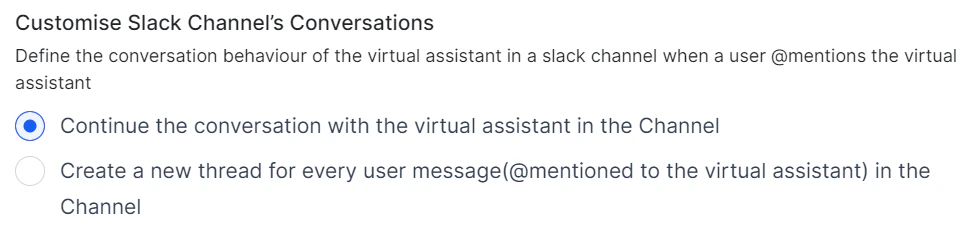
Updated Default Start Flow All fields of the default Start Flows can now be edited except the associated channel.Learn more → Support for Thread Handling for Virtual Assistants in Slack Channels The Platform now offers native support for threaded conversations in the Slack channel. Users can initiate a new thread from any message within a Slack channel or direct message group. Additionally, the platform provides extended functionality for developers. It can automatically create a new thread whenever a user @mentions the virtual assistant in a Slack channel. This behavior is configurable, giving developers control over this feature.\