
Note: This feature is only available when an Alert, Action, or Information task is configured for the assistant. Learn moreGo to Conversation Intelligence > Conversation Management > Ignore Words & Field Memory.
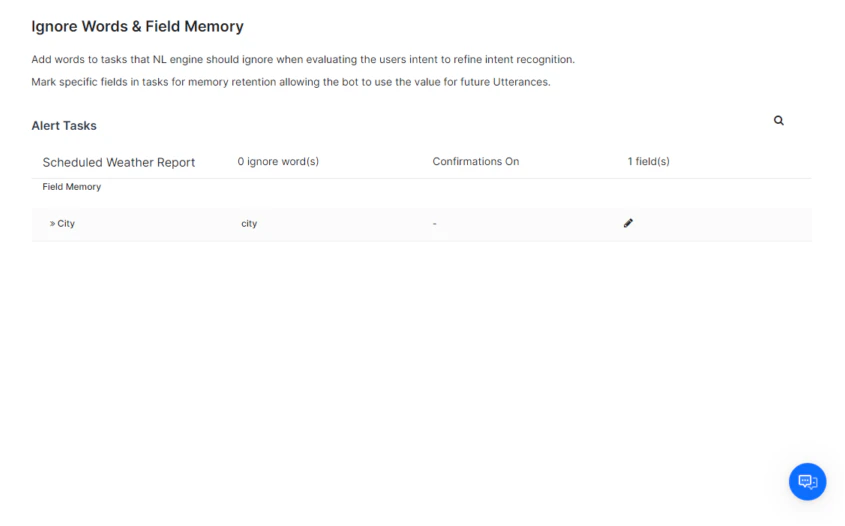
Manage Ignore Words for a Task
- Go to Conversation Intelligence > Conversation Management > Ignore Words & Field Memory.
- Hover over the task name and click Edit. The Edit Task window opens.
- Configure the following:
- Turn Off Confirmation Messages — Select Yes to skip execution confirmation when using NLP. Select No to prompt the user before running the task.
- Ignore Words — Enter words to exclude from task interpretation. For example, for a 7-Day Weather Forecast task, you might add days of the week since all days are always included.
- Click Save.
Example: For the input “I want to get the weather forecast for today”, the NLP engine only needs to recognize weather, forecast, and today. Common words like I, want, and get are already handled by the built-in ignore words list.
Manage Field Memory for a Task
Field Memory persists entity values from a completed task so they can be pre-populated in a related task.Example: In a travel assistant, Get Wait Times for Boarding can pre-populate fields in Book a FastPass.
- Click the Task Name to expand its task fields.
- Click the Edit icon next to a field to open the Field Memory window.
- Configure the following:
- Entity Type — Select the expected input type to improve NLP recognition. Learn more
- Memory User-Provided Value — Choose one of:
- No, do not memorize — Value is not persisted after the task completes.
- Yes, memorize this value — Value is persisted for the specified duration (in minutes).
- Click Save.